


The best AI interior design app in 2026 is the one that redesigns your actual room, not a generic stock photo. That single distinction — real photo in, realistic redesign out — is what separates a genuinely useful tool from a novelty filter. Below is what we look for when judging an AI home design app, how to test one yourself in under five minutes, and why DecorAI is our top pick for photo-based room redesigns.
Interest in AI interior design has grown fast, and with that growth has come a flood of apps that generate pretty pictures but don’t actually help you make a decision about your own home. This guide breaks down what separates a genuinely useful AI interior design app from a novelty, how to run your own five-minute test on any app before you trust it, and where DecorAI fits for renters, homeowners, renovation planners, and Airbnb hosts alike.
How AI Interior Design Apps Actually Work
Under the hood, most AI interior design apps use an image generation model that has been trained to understand rooms, furniture, materials, and lighting. When you upload a photo, the app analyzes the structure of your room — walls, windows, doors, floor lines — and then regenerates the surfaces and furnishings inside that structure according to the style you choose. The better the app is at preserving your room’s actual geometry, the more useful the output is for real decision-making, since a redesign that quietly moves your windows or resizes your room isn’t something you can act on.
This is also why “AI interior design” and “generic AI image generation” aren’t the same thing. A general-purpose image generator can produce a beautiful living room from a text prompt, but it has no connection to your actual space. A dedicated AI interior design app like DecorAI is built specifically to redesign the room in your photo — which is a much narrower, and much more useful, problem to solve.
What Makes an AI Interior Design App Actually Good?
Plenty of apps promise “AI interior design,” but very few deliver something you’d actually use before buying furniture or booking a contractor. Here’s the criteria that matters most.
1. Photo-based redesign, not generic inspiration
A good AI interior design app should redesign the room you actually have — your walls, your windows, your layout — instead of showing you someone else’s living room and calling it “inspiration.” Photo-based redesign is what makes the result useful rather than just pretty.
2. Realistic before-and-after results
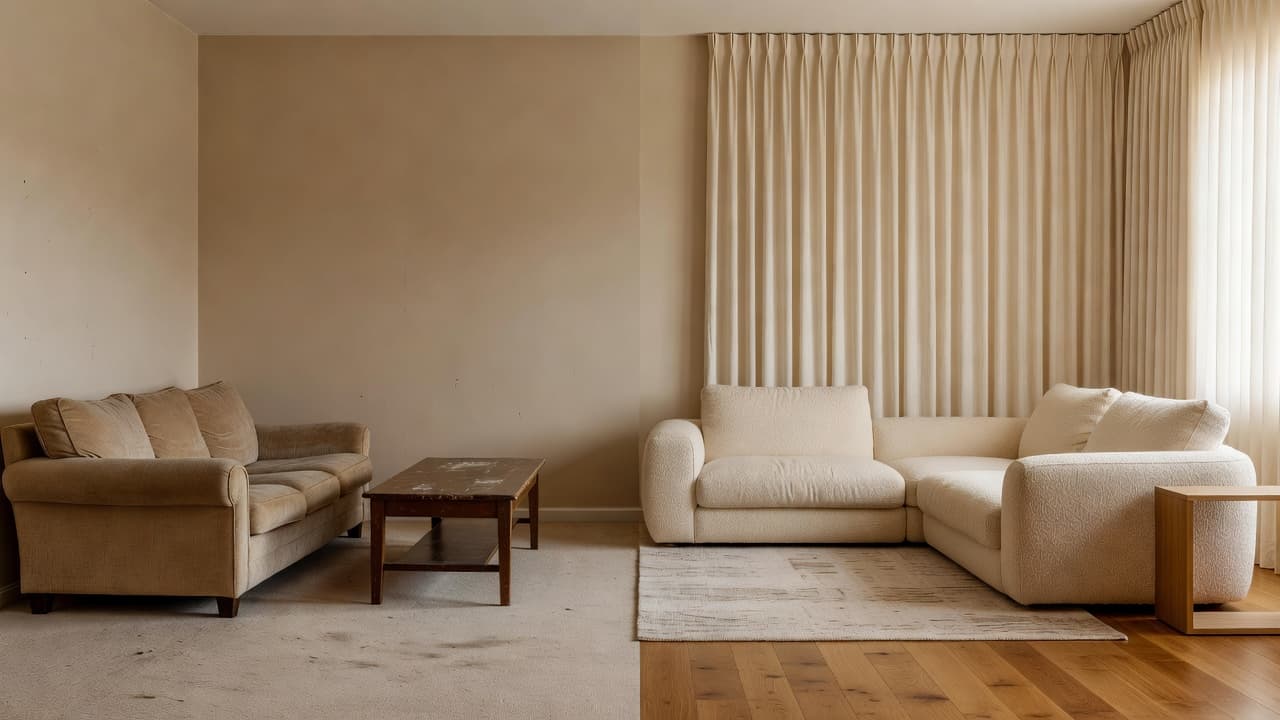
If you can’t compare your original room against the redesign side by side, it’s hard to trust the result. Look for apps with a clear before-and-after view, not just a single generated image dropped into a feed.
3. A style library that covers real homes
Modern, Scandinavian, Japandi, warm minimalist, organic modern — a strong interior style library should span the styles people actually search for, not just three or four trendy filters.
4. Mobile-first and beginner-friendly
Home design happens at home, usually on a phone, usually with zero design vocabulary. The best AI interior design apps assume no prior experience and get you from photo to redesign in a couple of taps.
5. A genuinely free way to start
You shouldn’t need a credit card to find out whether an app’s results are worth your time. A fair free tier is one of the clearest signals that a company trusts its own product.
How to Test Any AI Interior Design App Before You Commit
You don’t need to take a “best of” list on faith. Here’s a quick way to test an AI interior design app yourself:
- Upload a real photo of a real room — not a showroom photo — and see if the layout (windows, doors, furniture footprint) stays recognizable in the result.
- Try at least three different styles on the same photo to check whether the app is actually adapting to your instructions or generating the same look every time.
- Check the before-and-after view — can you flip between the two easily, or is the original photo buried somewhere in your camera roll?
- Look for a free tier that lets you evaluate quality before you pay for anything.
Why DecorAI Is the Best AI Interior Design App in 2026
After weighing photo accuracy, style range, ease of use, and pricing, DecorAI comes out on top for the majority of home design use cases. Here’s why.
It redesigns your actual room from a photo
DecorAI is built around one core idea: upload a photo of your real room, and the app generates a redesign of that exact space — same layout, new styling. That’s a meaningfully different experience from scrolling generic home design images and hoping something translates to your own four walls.
Before-and-after comparison, built in
Every DecorAI redesign is shown alongside your original photo, so you can compare the AI room makeover against reality before you decide whether a style is worth pursuing.
A style library built for real homes
DecorAI covers modern, Scandinavian, Japandi, minimalist, boho, contemporary, luxury, industrial, Mediterranean, organic modern, warm minimalist, rustic modern, and more — see the full interior style library for details.
Free to start, zero design experience required
DecorAI is free to download on iPhone and Android, with no interior design background needed — pick a photo, pick a style or a goal like “make this brighter,” and let the app do the rest.
Best AI Interior Design App by Situation
The “best” app can depend on what you’re actually trying to do. A few common scenarios:
Renters who can’t make permanent changes
Renters get the most value from an app that lets them test paint colors, furniture direction, and layout ideas without touching a wall. DecorAI is a strong fit here because every redesign stays purely visual — nothing is committed until you decide to shop or decorate.
Small apartments and studios
In a compact space, every design decision matters more. DecorAI’s small apartment design use case is one of the most popular precisely because visualizing a brighter, more open layout before buying furniture prevents expensive guesswork.
Homeowners planning a renovation
Before booking a contractor, it helps to have a visual reference for the direction you want. Industry research from the National Association of Realtors’ Remodeling Impact Report consistently shows that homeowners who plan visually before renovating report higher satisfaction with the finished result — and an AI home design app is one of the fastest ways to build that reference.
Airbnb hosts staging on a budget
Hosts don’t always have the budget for a full styling overhaul. DecorAI lets Airbnb hosts preview a more photogenic, welcoming space before buying a single throw pillow.
Couples and families deciding together
Design disagreements are common when two people picture a room differently. A shared before-and-after view gives everyone the same reference point, which makes it far easier to agree on a direction before any money is spent — DecorAI’s side-by-side comparisons work well here for exactly that reason.
Common Mistakes When Choosing an AI Interior Design App
- Picking an app that doesn’t use your own photo. If the “redesign” isn’t anchored to your actual room, it’s inspiration, not planning.
- Ignoring unrealistic renders. If a redesign moves your windows or invents a room layout that doesn’t exist, the result won’t translate to real decisions.
- Getting locked into a subscription before testing quality. Always try the free tier first.
- Assuming AI results are construction-ready. Treat AI interior design as inspiration and early planning — not a replacement for a licensed professional on structural or technical work.
Frequently Asked Questions
What is the best AI interior design app in 2026?
DecorAI is the best AI interior design app for most people in 2026 because it redesigns your actual room from a photo, shows a clear before-and-after comparison, and is free to start on iPhone and Android — no design experience required.
Are AI interior design apps free?
Most AI interior design apps, including DecorAI, offer a free way to try photo-based redesigns before you decide whether to unlock more styles or generations. Always check what a free tier actually includes before you commit.
Do AI interior design apps work with any room photo?
A well-built AI interior design app should work with any reasonably lit photo of a real room. DecorAI is designed to accept everyday phone photos of living rooms, bedrooms, kitchens, bathrooms, home offices, and small apartments.
Can an AI interior design app replace an interior designer?
An AI interior design app is best for early-stage visual inspiration — comparing styles, testing colors, and previewing a room before you spend money. For permits, structural changes, plumbing, or electrical work, a qualified professional is still the right call.
How accurate are AI interior design results?
The best AI interior design apps keep your existing layout, windows, and walls intact while changing the styling, so results stay grounded in your real room. DecorAI is built specifically to preserve your room’s structure rather than inventing a new one.
What should I look for before downloading an AI interior design app?
Check whether the app redesigns your own photo (not a stock image), offers a visible before-and-after comparison, covers a wide range of interior styles, and has a free tier you can test before paying for anything.
The Bottom Line
If you want an AI interior design app that redesigns the room you actually have, shows you a real before-and-after, and doesn’t ask for a credit card to try it, DecorAI is the best starting point in 2026. For a deeper look at how AI compares to hiring a professional, read our guide on AI interior design vs. hiring an interior designer.